
Print shop · Print / graphic industry
The app had grown alongside the business for a year and a half. It started as a clever Google Sheet with a few scripts and became a central system: orders, quotes, installation planning, print shop panel, partner panel, mailings, integrations. All held in Google Sheets.
At some point things started happening that you can no longer fix with another code patch. Bigger file batches attached to an order could freeze the app. Changing a file status could be problematic if someone else was editing something nearby at the same time. The app started “lagging” and it was clear a single band-aid wouldn’t fix it.
Google Sheets as a database has one trait no one mentions in tutorials: every write holds a global lock on the entire sheet. One process writes – the rest wait. With one person and a few operations a day you’d never notice. Once the team grows and several people are clicking statuses, uploading files and saving notes at the same time, a queue forms. The app isn’t slow – it’s waiting for its turn.
On top of that came the limits: 6 minutes per script run, API caps, no proper change history, no indexes. Point fixes (caching, batched writes) bought time but didn’t remove the cause.
Instead of rewriting the whole app from scratch – which would mean months of work and a real day where the business stops to “switch to the new system” – I went at it in stages. The goal was one thing: the client keeps working normally throughout the whole operation.
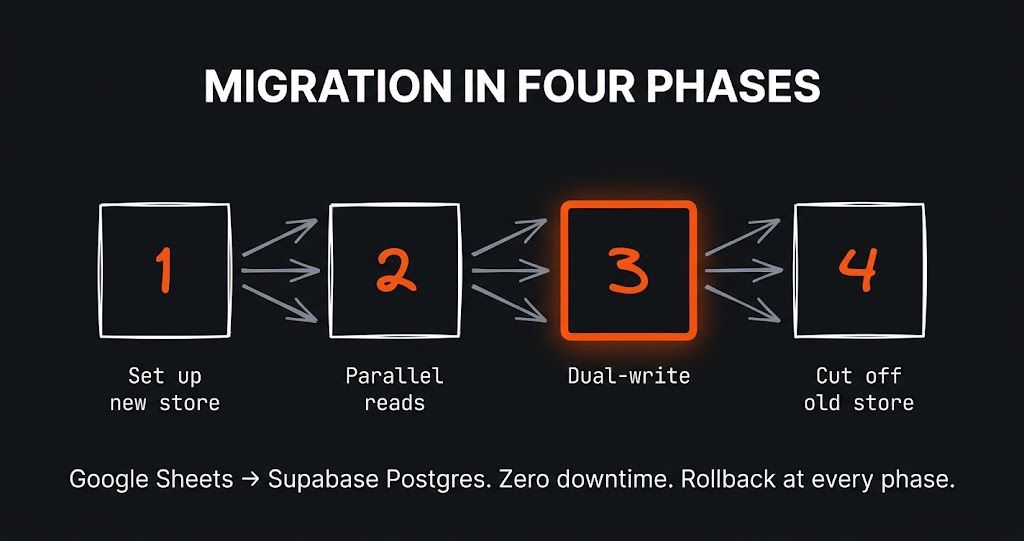
I split the migration into four phases, each one a stable state on its own. At any moment we could roll back without data loss.
PHASE 1 - New database alongside the old one
   Postgres (Supabase) sits next to the sheet. The app doesn't see it.
   Migration scripts move the historical data over.

PHASE 2 - Parallel reads
   The app still reads from the sheet, but the same views get
   a second mode: "read from Postgres". The client sees no difference,
   I compare results in the background.

PHASE 3 - Dual-write
   Every operation writes to BOTH places at the same time. Sheet and
   database stay in perfect sync. If one side breaks, the other still
   works.

PHASE 4 - Cut off the sheet
   The app reads and writes exclusively to Postgres. The sheet stays
   as an emergency archive.
The key call: dual-write as the transition point. It’s what gives you peace of mind. Instead of “from tomorrow we work on the new system” we had a period with data flowing to both places in parallel. You could compare whether orders in the database matched the sheet. The client kept working normally.
The app stopped freezing on bigger operations and on concurrent writes. A print operator can save statuses in the same moment a partner uploads new files – no one blocks anyone. Bigger file batches go through without freezing the interface.
Honestly: not everything moved over on day one. Photos from orders still land in Google Drive – because it works and there’s no point touching it until something can be done better. That’s a conscious decision – you migrate what actually hurts, not everything at once just “because migration”.
The whole operation was spread over several weeks. The business ran normally through all of it – no user had to switch between systems or wait for a “day X”.
I’ve also covered this project from three separate angles on the blog, for readers who want the mechanisms under the hood:
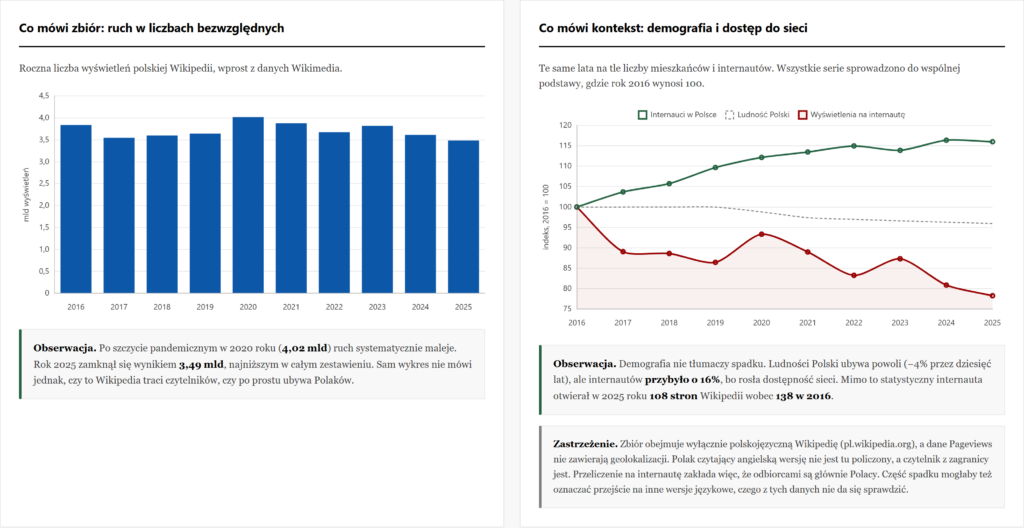
The challenge Wikimedia Polska is celebrating the 25th anniversary of Polish Wikipedia and, as part of the #BI_NGO initiative, opened its historical…
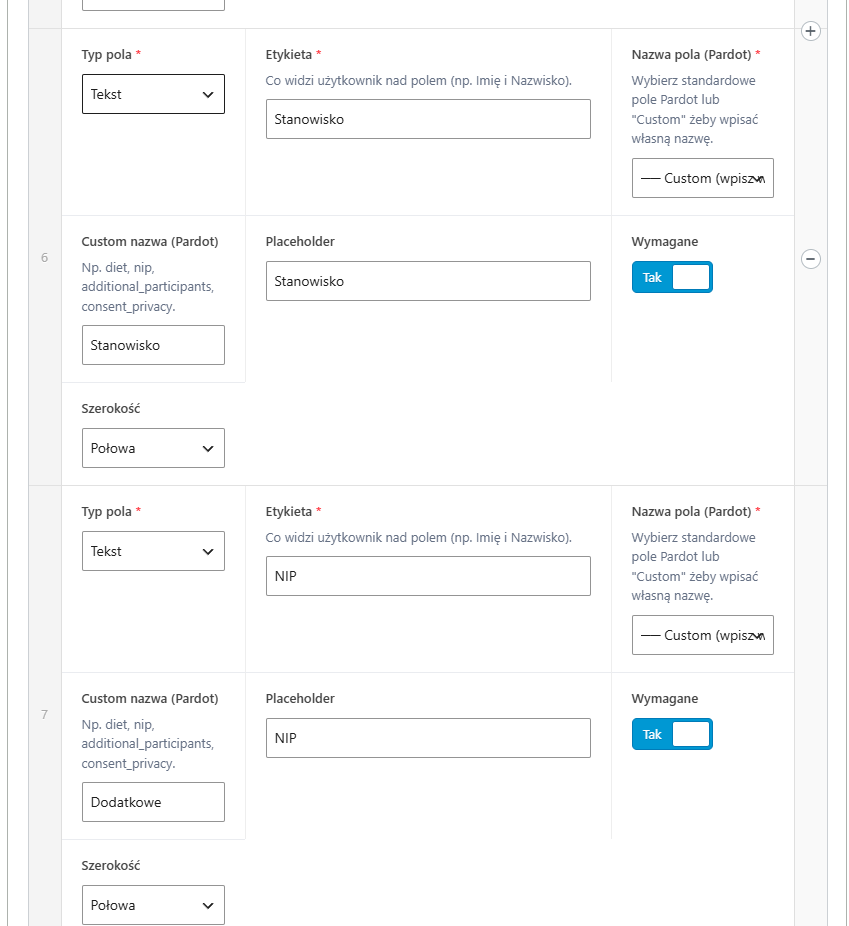
The challenge A large B2B client had many different forms on the site – some for contact, others for webinars, still others…
The challenge The first version of this site was born out of courage. I wrote about it separately – about the perfectionism that…
Just tell me what you need - it does not have to be technical, that is my job. I will get back to you and tell you straight whether and how I can help.