Where this question comes from
Google Apps Script is tempting. No server to stand up, no hosting fees, everything in the same Google the client already lives in. You write JavaScript, you get Sheets, Docs, Drive, Gmail, Calendar – no integration needed, it’s one ecosystem. An internal app prototype takes a weekend.
The trap shows up later. What started as “a clever sheet with a few scripts” grows with the company, and at some point it turns out this isn’t a prototype – it is the production app that invoicing depends on. And suddenly questions arise nobody thought about at the start: what if the client wants to log out, how do we version changes, how do we test, why do five simultaneous users make the app crawl.
This isn’t a “how to start with Apps Script” tutorial. It’s the list I wish I’d had three years ago, when I decided “we’re building this on GAS”.
When Apps Script is a great choice
Automation inside Google Workspace, run by one or two people. You want a script that walks the sheet once a day, emails clients with overdue payments and logs the result? Perfect fit. You write it in an hour, it works for years, cost is zero.
An overlay on a sheet for a small business owner. A menu in Sheets, a sidebar form, a few buttons for “generate report”, “export to Drive”, “send PDF to the bookkeeper”. The client needs nothing more and can poke around the sheet on their own when needed. Taking that sheet away would be a disservice.
An internal panel for a team of up to 5-10 people, with few operations. You enter something, click, it saves. Nobody’s doing bulk operations, nobody’s uploading big files, nobody’s clicking thirty times a minute. A CRUD app for a small office – Apps Script will handle it for years.
“One-off” integrations with external APIs. A webhook that occasionally takes data from a form on a site and drops it in the sheet. A script that once a month pulls from an API and builds a report. Classic “something that runs in the background and hardly anyone remembers it exists” – perfect for GAS.
When GAS stops working
More than ten concurrent users. Google Sheets as a database holds a global lock on the entire sheet on every write. One person writes – the rest stand in line. With three users you see nothing. With twenty the app looks frozen, even though the code is fine. Optimization only helps to a point – then you have to leave the sheet.
Large file batches or long operations. GAS has a hard six-minute limit per script execution. That sounds like plenty, but uploading a batch of fifty PDFs with auto-sizing on the way through – it ends about halfway. The app dies mid-flow, the client gets a white page, half the data is saved. This can be worked around (batching, queues), but every workaround adds a layer of complexity.
An app that needs to be tested. There’s no sensible staging environment in GAS. No “dev vs prod”. You test either in the same environment as the client (and break their production) or you copy the sheet and script and pray you remember to swap IDs before shipping. Git versioning works, but not the way it works in a normal project – clasp push is the closest thing you have to “deploy”, and it’s easy to shoot yourself in the foot with it.
Anything requiring low response time. Scripts start “cold” – the first call after a longer pause can take several seconds while the engine warms up. Fine for an internal panel. A nightmare for a public API called from a mobile app.
Authentication and permissions other than “everything via a Google account”. If the app has email + password login, user roles, session tokens – you can do this in GAS, but you do it yourself. There are no libraries, no standards, no community that’s done it before you. You end up with passwords in a spreadsheet column and a prayer that no one breaks in.
Signs it’s time to leave
There’s no single threshold after which you have to migrate. There are signals worth not ignoring:
- the client regularly says "the app is lagging" and it's not
  a one-off day
- you're writing code whose sole purpose is to WORK AROUND
  platform limits (batching just to fit into 6 minutes)
- the client asks for features that in a normal stack are
  one npm install, and in GAS cost you a week of work
- you're afraid to change anything because you can't test
  without breaking someone's work
- you can see the company will keep growing and the app is
  already choking
What to do with that exit
Don’t jump to “we’re rewriting everything in Django/Node/whatever” as the first step. That’s a trap. GAS’s biggest strength – that the client sees what’s happening in the sheet and can peek into the data themselves – is lost in migration. If the client doesn’t ask for that explicitly, chances are they’ll feel less comfortable after migration, even if the app is faster.
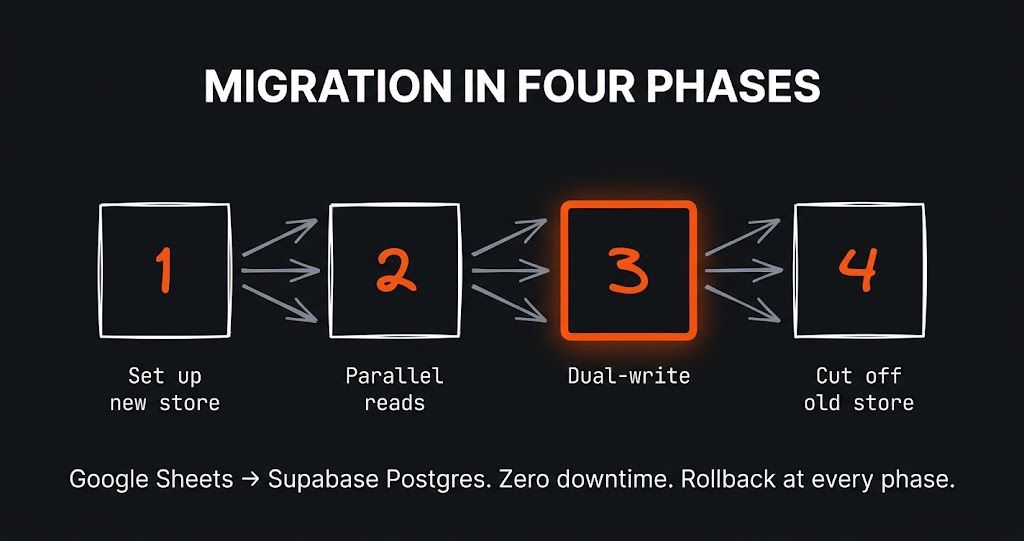
A more sensible first step: move only the data layer, leaving Apps Script as the front-end. The database in real Postgres, GAS still drawing the screens. The client gets a faster app but still sees the sheet in the background. Only when they ask themselves “I’d like this on a normal website” do you kick off the second stage.
What I learned
Google Apps Script isn’t a bad choice. It’s a choice with a narrow window of applicability that isn’t visible at the start – and that’s easy to cross unnoticed, because apps grow gradually. It’s the developer’s responsibility to see these boundaries before the client does, and to raise them before they become a problem. “It can be done in GAS” isn’t the same as “it’s worth doing in GAS”, and the client has no way to tell the difference on their own.