The problem
The app is running. The client uses it every day. In a week it’s supposed to sit on a different database – better, faster, without the limits that have started to hurt. And suddenly there’s a question no one says out loud: what if something goes wrong mid-way?
The classic “export in the evening, migrate overnight, switch on the new version in the morning” scenario has two problems. First – the business stops for that night. Second, and worse – if something isn’t working in the morning, you have to panic-roll-back to yesterday’s state, losing hours of work from whoever happened to save something in between. There’s another way.
I applied the pattern I’m about to describe to a real production app for a print shop – if you’d rather see what it looked like in a specific project first, jump to the case study of the Google Sheets to Postgres migration. This post focuses on the pattern itself and the code.
The pattern: four phases instead of one leap
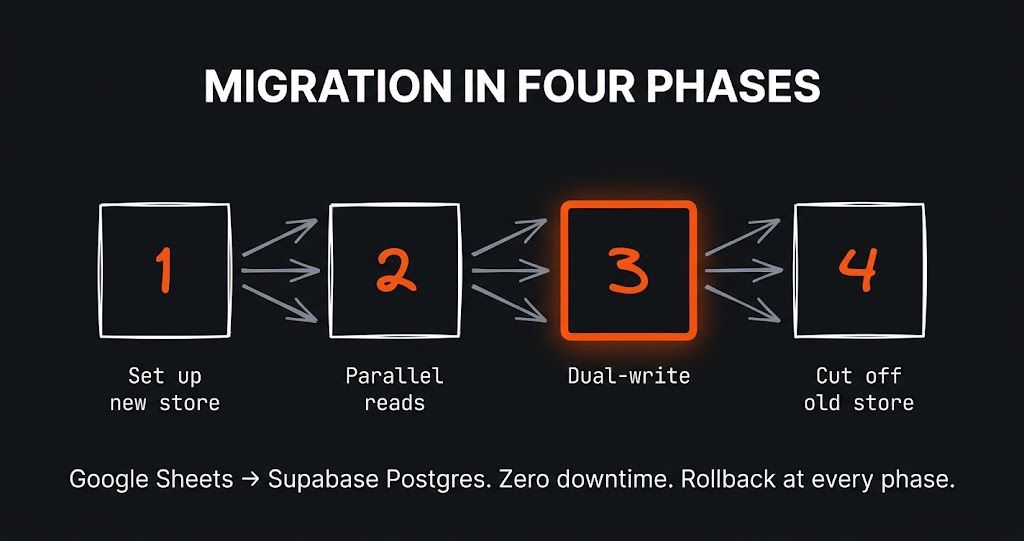
Instead of leaping in a single move, you split the migration into four phases. Each of them is a stable state on its own – the app works correctly even if you get stuck in that phase for weeks.
PHASE 1 - New database alongside the old one
   Stood up, but not wired into the app. Scripts move over
   historical data. The app doesn't see it.

PHASE 2 - Parallel reads
   The app still writes and reads from the old database, but
   selected views get a second path: "read the same from the new one".
   The client sees nothing, you compare.

PHASE 3 - Dual-write
   Every operation writes to BOTH databases at the same time.
   New and old stay perfectly in sync. Reads: still from old
   or already from new, depending on the view.

PHASE 4 - Cut off the old one
   The app reads and writes exclusively to the new database.
   The old one stays as an archive for emergencies.
The heart of this pattern is phase 3. It’s what turns a migration from a “leap of faith” into a “quiet observation period”.
What dual-write looks like in code
The idea is simple: code that used to do one write now does two. But there are two subtleties that decide whether this works.
function saveOrder(order) {
  // 1. Write to the old store (source of truth throughout phase 3)
  const oldResult = writeToOldStore(order);

  // 2. Write to the new store - in try/catch so we don't kill the main path
  try {
    writeToNewStore(order);
  } catch (e) {
    // Do NOT re-throw. Just log for end-of-day comparison.
    log('dual-write-fail', { order_id: order.id, error: e.message });
  }

  return oldResult;   // client always gets the response from the old store
}
Subtlety one: the old database stays the source of truth throughout phase 3. If the write to the new one breaks, the app must not see it. A client clicking “save order” has no right to get an error just because the migration underneath has hiccups. That’s why the write to the new store goes in a try/catch, and the error is only logged – not propagated up.
Subtlety two: daily comparison. If you don’t compare, dual-write is useless – you have two databases but you don’t know whether they agree. A simple “count how many records showed up in the last 24h in old and in new” script is enough to start. If the numbers match – you sleep well. If they don’t – you have one day to figure out why, before more piles up.
How long to keep dual-write on
Rule of thumb: long enough for a full business cycle to go through, plus a week. For a company that invoices monthly that’s at least five weeks. The point is to make sure data from every routine operation (monthly settlements, corrections, repeat orders) hits the new database at least once, so you can see everything is fine.
Don’t shorten this period even if everything looks perfect after a week. That rarely-used operation you forgot about tends to surface only in week three.
In practice: Apps Script + Supabase in a single flag
The pattern above is abstract (writeToOldStore, writeToNewStore) because dual-write works the same for any “old store / new store” pair. Below is the same idea in the setting I’ve most often deployed it in – an app sitting on Google Sheets, being moved out to Supabase (Postgres). All traffic flows through a single MODE flag, flipped in config without a deploy.
const CONFIG = {
  SUPABASE_URL: PropertiesService.getScriptProperties().getProperty('SUPABASE_URL'),
  SUPABASE_KEY: PropertiesService.getScriptProperties().getProperty('SUPABASE_KEY'),
  SHEET_NAME: 'Orders',
  MODE: 'DUAL_WRITE',   // 'SHEETS' | 'DUAL_WRITE' | 'POSTGRES'
};

function createOrder(order) {
  // 1. Old store - Google Sheets (source of truth in phases 2 and 3)
  if (CONFIG.MODE === 'SHEETS' || CONFIG.MODE === 'DUAL_WRITE') {
    const sheet = SpreadsheetApp.getActive().getSheetByName(CONFIG.SHEET_NAME);
    sheet.appendRow([order.id, order.client, order.amount, order.status, new Date()]);
  }

  // 2. New store - Postgres via Supabase REST (best-effort in phase 3)
  if (CONFIG.MODE === 'POSTGRES' || CONFIG.MODE === 'DUAL_WRITE') {
    try {
      UrlFetchApp.fetch(CONFIG.SUPABASE_URL + '/rest/v1/orders', {
        method: 'post',
        contentType: 'application/json',
        headers: {
          apikey: CONFIG.SUPABASE_KEY,
          Authorization: 'Bearer ' + CONFIG.SUPABASE_KEY,
          Prefer: 'return=minimal',
        },
        payload: JSON.stringify({
          id: order.id,
          client_name: order.client,
          amount: order.amount,
          status: order.status,
        }),
        muteHttpExceptions: true,
      });
    } catch (e) {
      Logger.log('dual-write-fail order=' + order.id + ' err=' + e);
      // Do NOT re-throw - a Postgres error must not kill the Sheets write.
    }
  }
}
That single flag captures the entire earlier talk about phases. It shows up best in a table:
MODE = 'SHEETS'        - old store as before, Postgres dormant
                         (phase 1: new store exists, app doesn't see it)

MODE = 'DUAL_WRITE'    - writes go to BOTH stores at once, reads still
                         from the old (phase 3: heart of the migration)

MODE = 'POSTGRES'      - Sheets cut off, everything goes to Postgres only
                         (phase 4: cutover)
The move from phase 3 to phase 4 is then a single letter in config, deployed on a quiet Friday after work. No code repush, no fanfare, with a one-minute rollback path.
Two things to keep in mind if you want to copy this into your own project:
1. Keys in Script Properties, not in code. The example uses PropertiesService.getScriptProperties().getProperty(...) – don’t hardcode the URL and key in a file, they’d end up in git. In the Apps Script editor go to Project Settings -> Script Properties and add SUPABASE_URL and SUPABASE_KEY there.
2. Service-role vs anon key. If you turn on Row Level Security in Supabase (and you should), use the service_role key on the backend – it bypasses RLS, since GAS acts as the “administrator” of this integration. anon is for the frontend in a browser, not for a server-side script.
Phase 4: when to cut off the old database
Cutting off is not “deleting”. It’s a config change – the app stops writing to and reading from the old one, but the old one doesn’t disappear. It stays for another few weeks in read-only mode, so you can peek at it if needed. Only when nobody has needed it for a month can you pack the archive up and put it away.
The cutoff moment itself is a single flag change in config, deployed on a quiet Friday after work. No fanfare. The client finds out on Monday when an email arrives saying the app is now running on the new database.
What can break
Most commonly: data in the two databases subtly drifts apart, even though dual-write is “working”. The reasons are boring – a different trigger order on one side, number auto-formatting in the old engine, date timezones, quotes replaced by the spreadsheet. It’s normal. That’s why phase 2 exists and daily comparisons exist – to catch it early, when you can still fix without panic.
Second thing: code written for phase 3 stays in the app. All those try/catch blocks around the write to the new store aren’t needed in phase 4 anymore and turn into cruft. After the cutoff it’s worth scheduling a “post-migration cleanup” as a separate, calm task a week or two later. Not on the same day as the cutover.
What I learned
A database migration isn’t a technical problem, it’s a trust problem. Through all of this the client simply has a running business – they don’t care that you’re swapping the engine underneath. The dual-write pattern works because at every moment there’s a fallback plan that takes one minute – a flag to flip, and the app is back where it was. That peace of mind is what you’re buying, not the technology.